.png?width=150&height=26&name=TrueTurn_Logo_rgb_Beige%20(2).png)
What are Conversion Triggers?
Conversion triggers show what brought a donor to your organisation before they made a donation. Each donation is automatically tagged by the platform with the channel or entry point the donor used — giving you a clear picture of which touchpoints on the TWINT Giving Portal are working hardest for you.
💡 Tip: Only conversion triggers that have actually been used by your donors will appear in your chart. If you don't see a trigger, it simply means no donations have come through that channel yet.
Where to Find Conversion Triggers
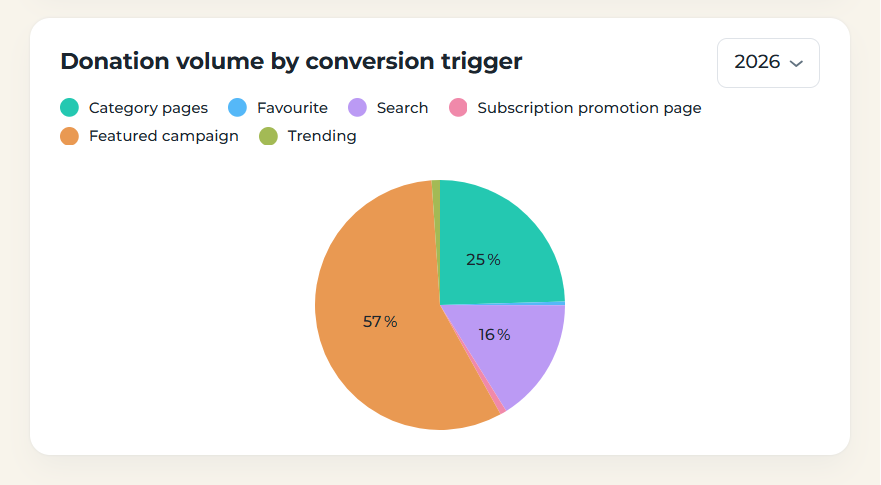
In TrueTurn Bridge, navigate to your Insights dashboard. The Donation volume by conversion trigger chart breaks down your total donation volume by channel for a selected time period.
[Visual: screenshot of the "Donation volume by conversion trigger" pie chart in TrueTurn Bridge]
Conversion Trigger Descriptions
Below is an explanation of each conversion trigger and what it tells you about your donors' behaviour.
Category Pages
Donors discovered your organisation by browsing a category on the TWINT Giving Portal home screen. Organisations are listed under up to three categories. A donation tagged as Category pages means the donor clicked on a category, found your profile there, and donated.
Current Focal Points
Your organisation appeared under Current focal points — a section on the home screen that highlights emergency and time-sensitive support topics.
⚙️ Only available with an Emergency listing.
Direct
The donor accessed your organisation directly via a link — for example, a link you shared in a newsletter, on your website, or on social media.
Favourite
Your organisation was saved as a favourite by the donor, and they donated from the Favorites section on the home screen. A favourite is set automatically when a user donates to your organisation, or manually by the user themselves.
💡 Tip: A high Favorite share indicates strong donor loyalty and repeat giving behaviour.
Organisation profile
If you have an active campaign, such as a Featured, emergency, or Recurring Donations campaign, these campaigns are displayed on your organization profile and donors can donate to them there.
Search
The donor found your organisation by using the search function on the TWINT Giving Portal.
💡 Tip: A high Search share suggests donors are actively looking for you. Make sure your profile name and description are clear and up to date.
Spotlight
Your organisation appeared in a Spotlight placement within the TWINT app. Spotlight is a booked campaign placement.
Subscription Promotion Page
The donor came from the Subscription promotion page, accessible via the home screen, which promotes organisations offering monthly (subscription) donations.
⚙️ Only available with the Subscription product.
Featured Campaign
The donor clicked on your Featured Campaign on the TWINT Giving Portal home screen and donated. Featured Campaign is a booked placement that drives donors directly to your campaign page.
Trending
Your organisation appeared in the Trending section on the home screen. An organisation is shown as trending when it shows strong donation growth over the last 7 days.
How to Use This Data
Use your conversion trigger breakdown to understand which channels are driving donations and where to focus your efforts:
- Channels you can influence directly — Direct, Search, and Featured Campaign teaser reflect actions you can actively optimise (sharing links, updating your profile, booking campaigns)
- Channels driven by donor behaviour — Trending and Favorite reflect organic engagement and loyalty you can nurture over time
- Channels tied to specific products — Current focal points and Subscription promotion page are only visible if you have the relevant listing or product active
Increase Your Visibility
To appear in more trigger channels, you should book a Featured Campaign. This places your campaign on the home page of the TWINT Donation Portal. The more donors your organization has, the more often it will be displayed in the Favorites and Trending sections.
Still Have Questions?
If you have any questions or need further assistance, feel free to reach out to us at support@trueturn.com. We're happy to help.